
One of the best things about running your own website is you control everything. Also, because you own and run the platform, you can use professional analytics tools to make investigations. And these tools can show you how visitors use your website.
A good analytics tool can give you insight – showing you what’s working and what isn’t. And the results can help you to improve your site and user experience.
Table of Contents
Bandwidth problems
Recently, I’d been having bandwidth issues on DJKippax.com. Lately, I’ve been receiving warnings by my web host I’m reaching my monthly transfer limits.
Now, I’m the first to admit I’m not a famous DJ, but this website has always received a decent number of visitors every month. And since I regularly started blogging, my traffic has grown even more.
My hip hop mix page and my oldskool house music page receive just under 5000 visits per month (and that figure is growing). This results in a lot of downloads and a lot of bandwidth.
This year alone my analytics software reports that over 100,000 people have downloaded my DJ mixes. Not bad for a sheep farmer in the rural North West of England (I own sheep I kid you not).
Anyway, all these downloads (as much as I love ‘em) create a problem. Namely, they eat up a LOT of bandwidth. My monthly usage is just under 1TB a month, and this is close to the limit enforced by my hosting company. And because my site is growing, I expect to exceed this cap any month now.
Therefore, I’ve been looking at solutions which might help my bandwidth problems.
One solution was to embed Mixcloud players into mix pages. Because, if I embed those players my mixes would be streamed from Mixcloud and not my site. I’d be using Mixcloud’s bandwidth and not mine.
Sounds perfect, doesn’t it?
Well, yes and no.
Why I removed Mixcloud from my site
A few years back I removed all the Mixcloud players from my website.
The reason: these players are slow to load. They’re embedded using Iframes and they significantly increase the weight of web pages. Place ten Mixcloud players on a web page and just watch your page load times soar.
You might think with today’s fast internet that slow web pages aren’t a problem. However, that assumption is wrong. After all, Google Chrome now warns its users if a website is slow.
Many of my site’s visitors view this website via a mobile device. And many of these visits come from outside the UK and the USA – where mobiles speeds aren’t as fast.
So, it’s in my interest, and my sites user interest, to keep things fast. Besides, who wants to use a slow website – no one!
Website speed
Website speed has become important. And over the last 3 years, I’ve spent time and money learning how to improve it.
WordPress is my first choice for building websites. And I’ve been using on DJKippax.com for approx. ten years now. I like WordPress: it’s easy to use and it comes with many powerful plugins which extend its features.
However, a badly configured WordPress website can be a pig to use. Install the wrong plugins, themes on a cheap hosting account, and you’ll up with a bloated mess which takes ages to load.
I now install my WordPress sites on VPSs (virtual private servers) rather than shared hosting accounts. All my websites (including this one) are hosted on a 2-CPU Linode, and this virtual server runs an optimised Nginx stack (thanks to Centminmod).
I install everything on the server via command line. On the backend, there’s not a server control panel insight. This lack of GUIs, and other unnecessariness, means my servers are lean and mean. A good server configuration is the foundation of a fast WordPress website.
To help minimise my page speeds I’ve also been careful to choose a lightweight WordPress theme. Not all WordPress themes are created equal. You often find that good looking themes produce bloated web pages – increasing page load times.
I’ve tested many different WordPress website themes on DJKippax.com and eventually settled with GeneratePress. It’s a lovely lightweight theme which provides a high degree of control over the look and feel of the website.
I’ve also added a robust caching plugin to this website called WP-Rocket. And I configure the caching plugin to make the most of my server Nginx setup. I also use Cloudflare as a CDN too.
How fast is DJKippax.com?
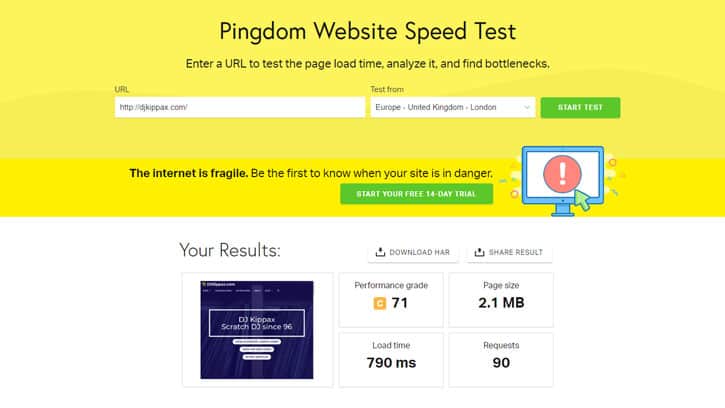
According to Pingdom, my site takes approx. 800ms secs to load.
As you can see, my approach results in a fast WordPress website.
But I still needed a solution to my DJ mix bandwidth problem, without it adding to my page load speeds.
So, I needed to test the Mixcloud players. And I needed answers these questions:
- Would it be worth trading page speed in exchange for using less bandwidth?
- Would my website users prefer streaming my DJ mixes to downloading them?
- Would the Mixcloud players send people away from my website?
How to improve any website: the golden rule
My No1 golden rules for creating a high performing websites is ‘test everything’.
My next golden rule is: if in doubt, see rule one.
You might wonder why test?
Well, testing dispels myths and assumptions. Testing can be revealing. And testing can stop you adding unnecessary crap to your website.
I’ve run many tests on DJKippax.com over the years. And it’s often shown me that ideas I thought were golden were nuggets of poo.
Anyway, I thought the easiest way to test my hypothesis was to utilise a heatmap tool.
Heatmaps
A heatmap is an analytics tool which tracks how people interact with a web page. They show what page elements people click on, how far they scroll, and the areas where they dwell.
There are many services which provide heatmaps, but my favourite is Hotjar. Hotjar has a free tier allows one-thousand impressions for every heatmap. And with the free version, you can track up to three pages at a time.
So, a while back I added the Mixcloud players and the heap map tracking code to my website and began tracking the results.
The outcome was surprising.
Test results
Out of one-thousand visitors, no one used the Mixcloud players.
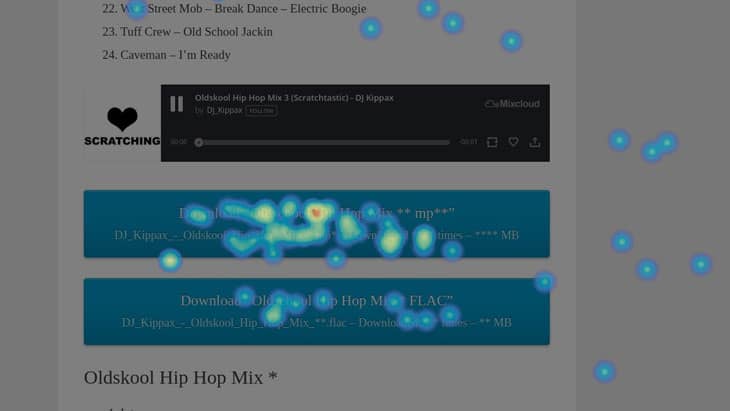
If you’re wondering how to read these heat maps, a brighter area indicates more interactions. Red areas are the most used, and dark area indicates little activity.
As you can see, most of my website visitors prefer to download a mix rather than a stream.
Also, no one ever clicked the ‘follow’ button on the Mixcloud player.
When I see results like this it confirms my theory that you should invest most of your time in a platform you own, rather than a 3rd party platform (like a Facebook page, Mixcloud profile, or a Soundcloud).
The 3rd party platforms have their place, which is to get people onto your website. Not the other way around.
Conclusion
Being able to run little tests like this is one advantage of having your own website.
Tests like this one can show you that ideas you thought were good turn out bad.
I’ve since removed the Mixcloud players. There’s no point keeping something on a page if no one will use it. Especially when that unused feature increases page load times.
Anyway, I’m glad my website visitors prefer downloads to streaming. Personally, I prefer downloading to streaming. Not being able to download mixes is one reason I dislike sites like Mixcloud.
Streaming is fine when you have a perfect internet connection. But when you live out-in-the-sticks like me, internet coverage can be flaky – thus affecting your ability to stream.
Plus, a downloaded mix can be easily shared and given to other people.
And, with a downloaded music file, you can play it how you want. Meaning, you can play the file on any media player you choose and any device.
Lastly, when you allow people to downloadable your music, you can distribute high fidelity files too -like 320CBR MP3s and lossless FLAC files.
Sadly, it seems like most of the internet is moving away from allowing users to download music files. And, what’s worse, is that sites like Mixcloud only allow users to stream mixes at 192kbs.
You’d think with the widespread availability of fast mobile internet, and ever-cheaper bandwidth costs, sites like Mixcloud would now distribute music at a reasonable bitrate. But you’d be wrong. DJ mix sound quality seems to have regressed.
This is another reason consider your own website if you’re serious about promoting your music. You can offer fans music files which are different, flexible and of high fidelity. You aren’t limited by the restrictions imposed by the platform owners. Plus, it’s a way to stand out from your competition.
As for my bandwidth problem, well I will have to find another solution. As this month rolls on, I can see according to my bandwidth stats, I’ve already consumed 2/3rds of my monthly quoter.
I have ideas on how to solve my bandwidth issue. If it works, I’ll report the results back here.
Lastly, I have quite a lot of experience building fast WordPress websites for individuals and small businesses. And I’ve helped many over the years. If you have a slow WordPress website. Or you want a fast WordPress website building, get in touch – I can help you.