
If you’re a new DJ, you might think YouTube is a fantastic source of music for mixing with. After all, it hosts an incredible amount of music.
Plus, it’s easy to download videos from YouTube and extract the audio. Meaning you could build a considerable track collection in a matter of hours – and all for free!
It’s also expensive to buy your DJ’ing track from sites like JunoDownload and BeatPort.
And record pool subscriptions aren’t cheap either.
So, as a DJ, it’s easy to think YouTube is the answer to your music collecting needs. But you’d be wrong.
And in this guide I will show you why you shouldn’t use YouTube tracks for DJ’ing and mixing.
Table of Contents
What Sound Quality Does YouTube use?
YouTube’s default sound quality is 128 kbs AAC. AAC stands for Advanced Audio Coding.
AAC is considered to sound better than MP3 when played at the same bitrates. So, a 128 kbs AAC should sound better than a 128 kbs MP3 – as long as you were comparing the same track.
How does YouTube Sound Quality compare with other music platforms?
YouTube’s default sound quality is half that of Spotify’s; which streams audio at 320 kbs MP3.
Soundcloud restricts its free users to 64kbs Opus. 64 kbs Opus is considered as good as 128kbs MP3. Paid Soundcloud Go users can stream audio at 256kbs Mp3.
YouTube Music – Google’s premium music subscription service – has better sound; users can stream audio at 256 kbs AAC.
What Sound Quality can I download YouTube tracks at?
When you download videos or audio from YouTube, most applications will extract a 128kbs AAC file from the MP4 video file.
Most YouTube downloading programs will give you the option of downloading at a lower bitrate. The only benefit this has is a smaller file size.
What’s the difference between AAC, MP3 and MP4?
You might wonder what the difference is between MP3, MP4 and AAC is?
MP3 and MP4 aren’t related. MP3 is an audio format, while MP4 is a video file.
Embedded in every MP4 is an audio stream which provides the sound for your MP4 video file. The audio format used inside your MP4 is an AAC stream. And it’s this audio stream which the YouTube ripping tools extract when grabbing tracks from YouTube videos.
To summarise: MP4 is simply a wrapper for your AAC audio file.
Why does YouTube use such a poor bitrate for streaming?
Most YouTube users browse the site using smartphones, tablets, or a laptop – devices which will often have small speakers which often produce poor sound.
For most, the sound quality produced by their smartphones, tablets, and laptops is good enough. And when YouTube is streamed through their devices it produces an acceptable level of sound quality. YouTube knows this. And it also knows that audio quality isn’t important for most of its users.
The video streaming site consumes less bandwidth if it uses low bitrate audio – this saves them money. Amplify this marginal bandwidth saving over billions of YouTube users, and you have a considerable cost saving.
How can I test YouTube’s sound quality?
The easiest way to test YouTube’s sound quality is by using your ears. There are other ways to judge it, but simply listening to tracks using good equipment is a good start.
I recommend getting lossless versions (FLACs, Wavs or AIFFs) of your tracks, and then compare your YouTube rips against them.
The best way to do a comprehensive listening test is to use something like Foobar’s ABX comparator plugin.
Now, if you’re using the built-in speakers on your phone, laptop, or tablet, you will struggle to accurately judge sound quality.
A good HIFI, pair of speakers, soundcard or headphones are critical when trying to test audio sources.
Basically, the better your audio equipment, the better you’ll be able to hear the flaws in your YouTube rips.
Who’s uploading your YouTube tracks?
Have you ever stopped to consider who is uploading your YouTube tracks? I think probably not.
Another problem with using YouTube songs for DJ mixes is: who’s uploading your music, and do they know what they’re doing?
I’ve known DJ’s who’ve uploaded their old ripped record collections to YouTube. Most ripped their tracks as mp3’s, unaware of better archival formats available like FLAC.
These DJ’s would combine their lossy Mp3 tracks with an image or video, render a music video, and then upload it to YouTube. The problem this approach is that you are converting a lossy audio format into another lossy audio format.
This is bad for sound quality because you’ve sacrificed some audio data when creating the mp3, and then even more information is lost when converting to AAC. To summarise: garbage in; even more garbage out.
If you’re lucky, the person creating a YouTube Music video might have used a Wav file in their video creation process. But I doubt this happens much. Wav is an unpopular archival format because you cannot embed artwork and meta tags.
FLACS or AIFFs are far more popular lossless audio formats for archiving music collections. But some video editing programs don’t allow the importing of FLACS or AIFFs as an audio stream.
Quite a few YouTube uploaders are ignorant of lossless file formats. And many don’t realise how lossless files can help improve audio quality during their video creation process.
So, when downloading YouTube tracks from unofficial sources, you should expect that some videos will have been created with mp3’s – which won’t help your sound.
Using Vevo tracks in DJ mixes
Official music video sources – like Vevo – will sound better. Because those videos will have been probably been mastered by a professional.
But, most Vevo tracks are usually radio edits which makes them shit for DJ’ing with.
But even though YouTube channels like Vevo have better sound, they’re still far from perfect. And in the next section, we will take a detailed look at some YouTube tracks, and we’ll learn how imperfect they really are.
How to analysis YouTube audio tracks
In this next section, I will compare three YouTube tracks with tracks I own.
I’ve picked a range of music; some old some new.
Also, by comparing a variety of tracks it shows that it’s not the mastering, or the age of a track which is at fault – it’s YouTube!
The tools used for this analysis are freely available. So, feel free to perform similar analysis yourself.
The tools used are:
Comparison 1: Prodigy Poison
The first track I will compare is Prodigy’s Poison. I own multiple copies of this album and some singles; both on CD and vinyl.
So, for this test, I dug out my single CD and ripped it to my hard disk using EAC.
For the YouTube version of the track, I’m using the official version of Poison, which is freely available on the Prodigy’s YouTube channel.


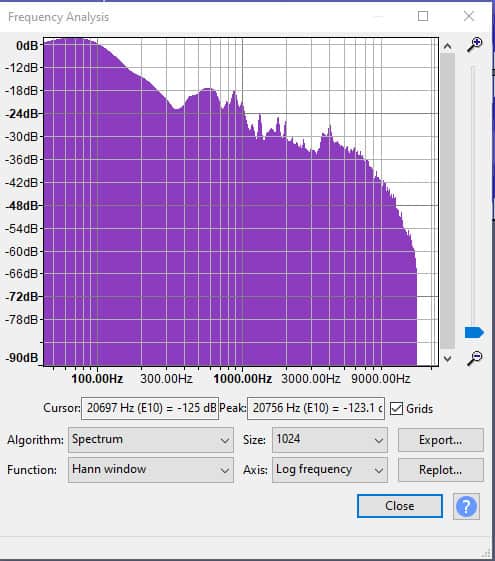
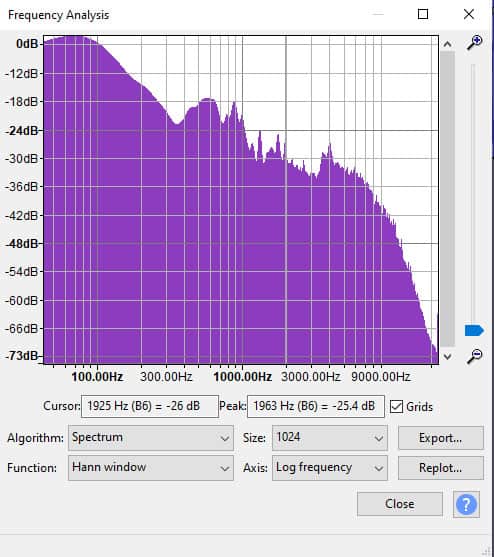
If you view the spectrum plots you can see the YouTube version of the track has all the frequencies above 15813Hz cut.
When I listen to the two songs on my Berringer DAC and Audio Technica ATH M50x headphones, I can hear differences between each track. The m4a sounds dull, muddy and seems to lack punch. The FLAC version sounds nice, punchy, and crisp – and the top end sounds much better.
Comparison two: TuneYards – Look at my hands
For our next comparison, we will use a modern music track. Because I want to show you that YouTube sound problems occur even with modern music.
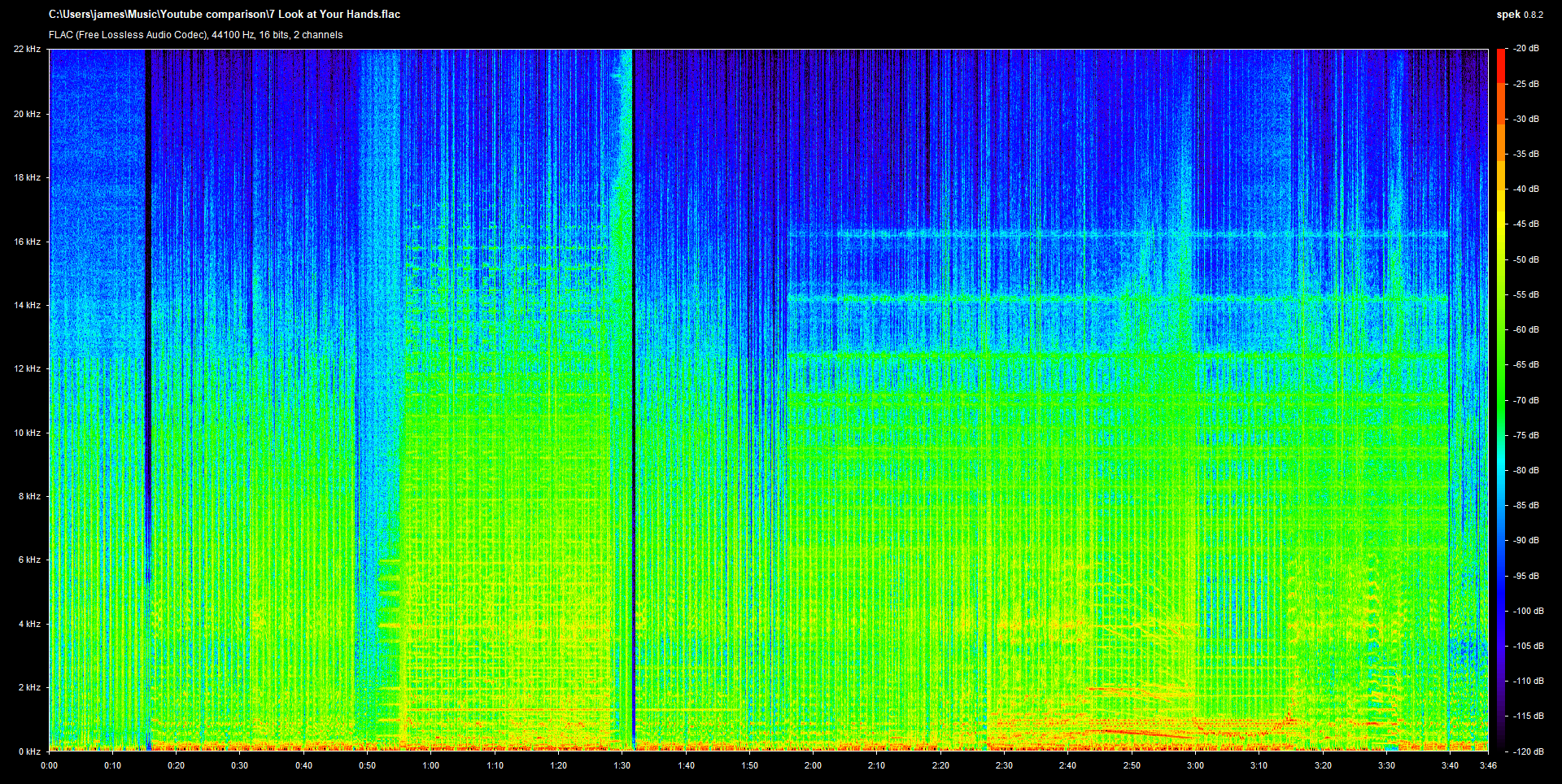
The track we will use is the fantastic TuneYards – Look at my hands. The lossless version of this track sounds fantastic on my good HiFi.



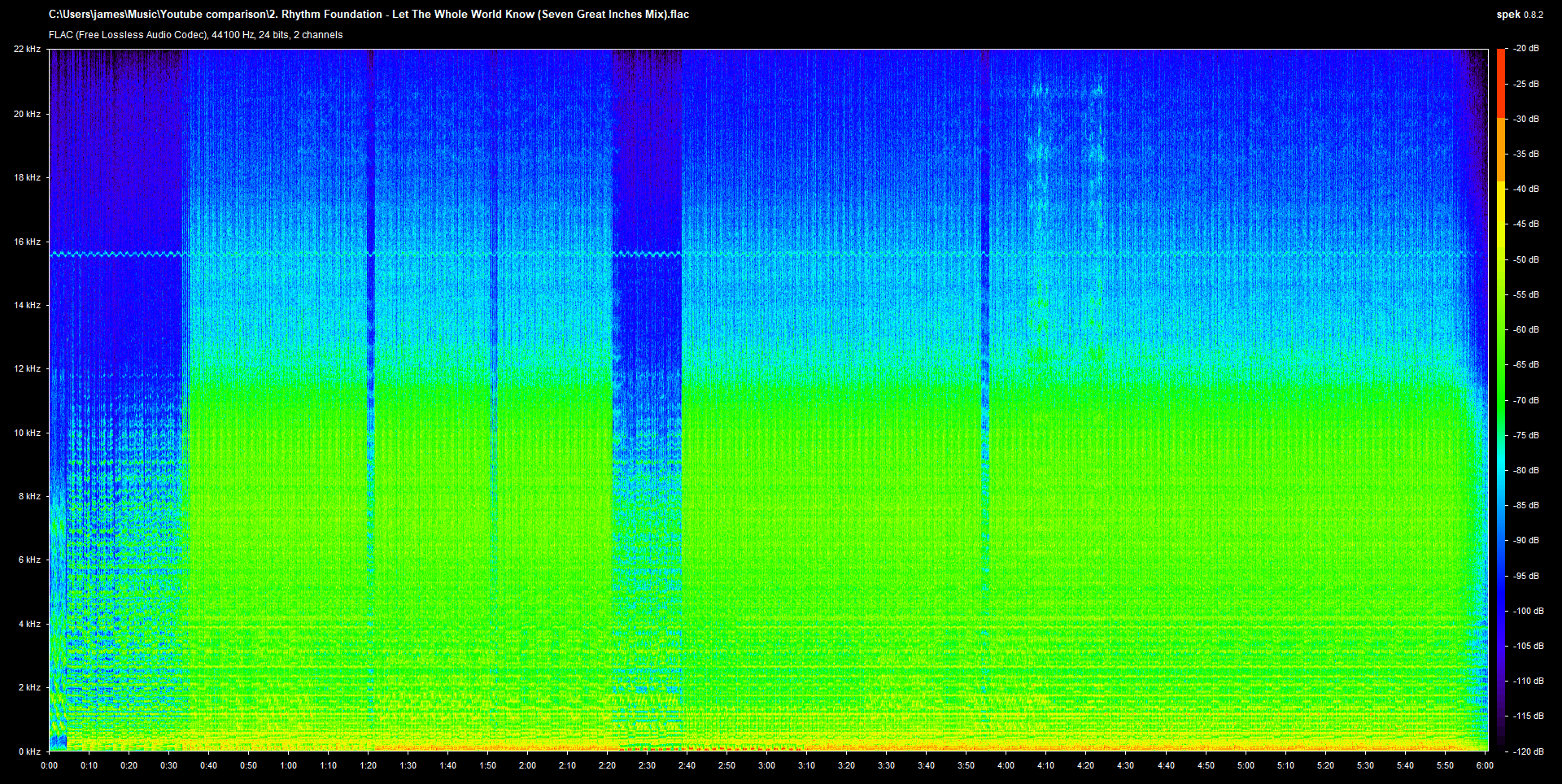
Comparison three: A vinyl rip of Rhythm Foundation – Let the Whole World Know
It’s hard to make like for like comparisons of vinyl rips because ripping vinyl is a complex process.
Every turntable, DJ mixer, pre-amp, phono cartridge and sound card will add colour to the vinyl recording process.
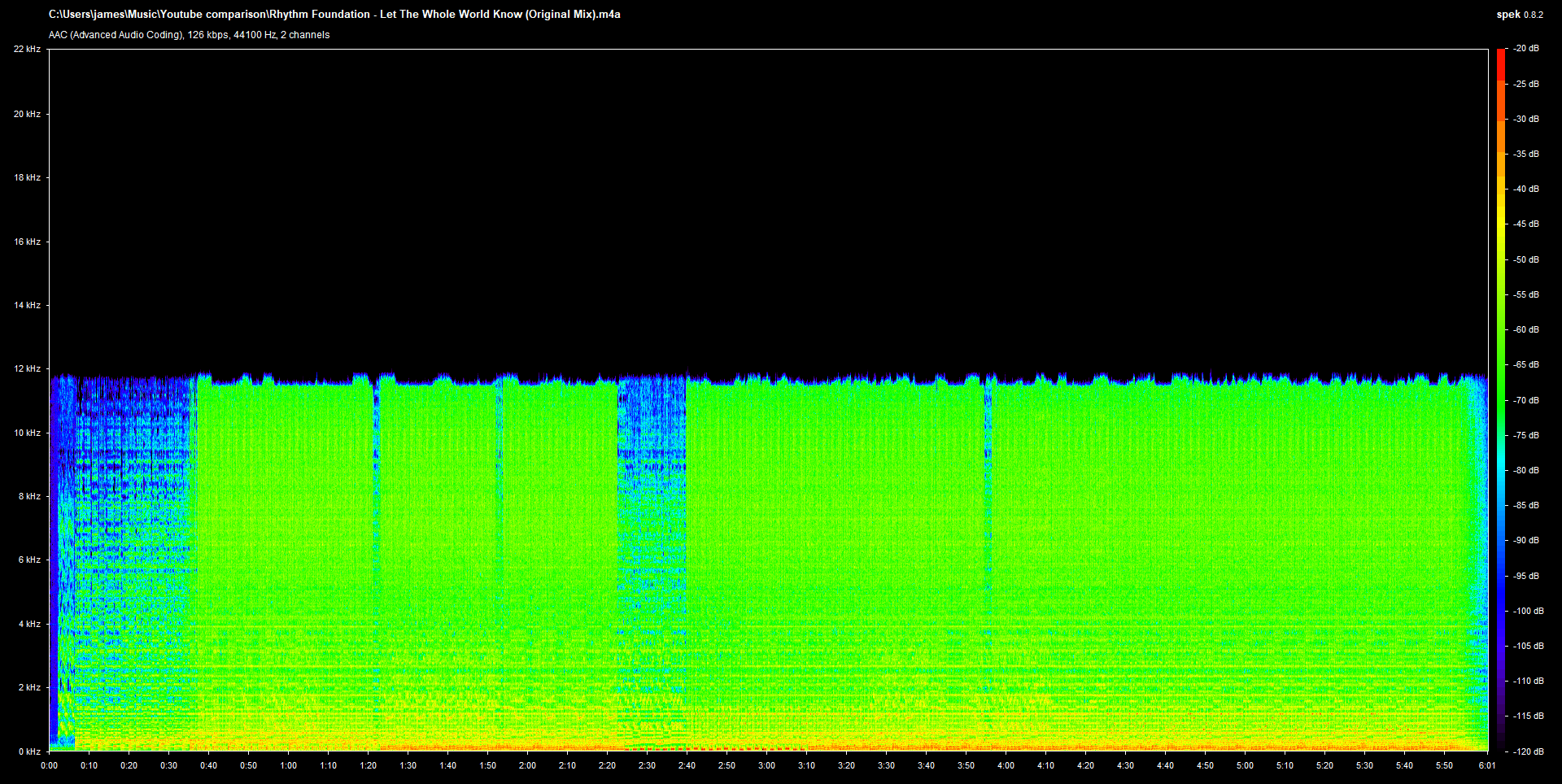
But as you can see in the results below, the negative effects of YouTube are the same even for digitised vinyl tracks.


YouTube Audio comparison conclusion
As you can see in all three examples, YouTube audio files are cut (on average) around 16 kHz. This is part of the reason YouTube tracks sound dull when compared with FLAC and even Mp3s.
If you are using YouTube tracks for DJ’ing, you are discarding a wide range of frequencies before you even start mixing.
How does track quality affect DJ’ing and DJ mixes
Let’s now consider what happens to your tracks when you’re mixing.
Because sound quality damage doesn’t just stop once you’ve extracted your tracks from YouTube – the DJ’ing, recording and mastering process also damage the sound.
Please note: this next bit only concerns digital DJ’ing. It doesn’t affect DJ’ing with vinyl, as no one in their right mind would extract a YouTube rip and go to the trouble of pressing it to vinyl.
The key point to remember is: every time audio is converted you lose sound quality and fidelity. Conversion adds nothing, it only takes away.
How Digital DJ’ing affects sound quality
Digital DJ’s have a few ways they can mix tunes. They are:
- CDJ’s/XDJ’s or other CD decks
- DJ controllers or mixing internally with DJ’ing software.
- DVS systems like Serato, Traktor or Ms Pinky combined with a turntable or cd deck
How does using YouTube rips with CDJs hurt sound quality?
Once you’ve downloaded your YouTube rips, you must convert them to an audio format which a CD deck will recognise.
If you’ve converted your YouTube AAC rips to MP3, you’ve just converted a lossy file format into another lossy file format. You’ve just made your poor sound quality even worse.
Some might convert their rips to Wavs, FLACs, or AIFFs. This process doesn’t magically add sound quality. It just preserves what’s already there; a 128kbs AAC with a 16khz cut-off.
Lastly, it worth remembering, that a CDJ/XDJ or CD deck needs to output an analogue signal to be heard. This is another conversion (and another loss of sound quality).
And if you’re passing the signal through a DJ mixer, and adding effects, you’ve just converted yet again – losing even more!
As you can see, the conversions easily mount up. And, in the cases of YouTube tracks, each conversion steals more slices from an already small pie.
Using YouTube rips with DJ’ing controllers and DJ’ing software?
Most DJ’ing software, DAWs or audio editors internally convert all loaded tracks to Wav or AIFF.
It may appear you are mixing an MP3, AAC or some other lossy format, but you’re not – you’ll be mixing or editing a Wav or AIFF.
Audio software, as I’ve mentioned above, converts lossy audio formats to Wav or AIFF for two reasons:
- It preserves sound quality (it does not improve it).
- It’s less taxing on system resources.
Finally, after mixing, the sum of the digital output will be converted again. Just like CDJ’s, the signal must be converted to analogue if it is to be heard.
So, like the CDJs, you cannot escape converting your YouTube rips. And each conversion causes a loss in sound quality.
How does using YouTube rips with a DVS system hurt sound quality?
A DVS system also must convert sound to analogue before it can be heard. The only difference with this DJ’ing is that the sound is converted upon leaving the sound card before it’s routed to a mixer.
How the quality of your equipment affects the quality of your converted audio
The price you pay for your DJ’ing gear determines the quality of the converters in your device.
Your £99 DJ controller won’t sound as good a high-end CDJ 2000, because it costs a lot of money to create good sound converters.
There’s a reason top recording studios pay top dollar for good quality ADC/DAC converters.
Personally, one of the biggest improvements I made to my HIFI system was buying a good DAC – this showed me how important the conversion process is.
There’s a fine art to making good converters, and many cheap DJ equipment manufacturers don’t get it right.
But the conversions don’t stop after mixing
If you’re recording your mix, mastering it, and then uploading to your favourite DJ mix hosting site, you’ll have converted your audio again – multiple times!
Your mix hosting site will probably convert your audio again to save bandwidth. Soundcloud forces free users to stream at 64 kbs Opus. So if you’ve uploaded your mix to Soundcloud it suffers yet another conversion.
Remember: every conversion drains yet more life from your mix. Especially, when you convert lossy sound into another lossy file format.
So, if you’re rendering your YouTube DJ mix to mp3 before uploading it to Soundcloud, Mixcloud, or HearThis, then you really are draining the last drop of blood from a desiccated corpse.
How can I avoid all these conversions?
Simple answer: You can’t.
You can only minimise the negative effects on sound quality by using the best quality sound at the beginning of the process. This is what recording studios try to do, DJ’ing and mixing tunes is no different.
Quality plugins, good gear, and converting your YouTube rip to a lossless file format adds nothing to your sound quality – it simply minimises the negative effect of the conversion process.
Look, using good quality tracks at the beginning of the mixing process is like baking a pie with the best ingredients possible. Cook it right and it’ll taste delicious. By contrast, trying to master a DJ mix full of YouTube rips is like baking a pie and using dogshit as the filling.
Legalities
Lastly, using YouTube rips is piracy because you ain’t paid for the tracks.
Conclusion
So that concludes my rant against using YouTube as a music source for DJ’ing.
The Tube might be okay if you’re just starting, but once you progress and you start uploading mixtapes, you should try to buy your tracks legitimately. Because if you don’t, your mixes will always sound dull, flat, and lifeless.
Also, I’ve been to raves over the last decade and have noticed some DJ’s playing music which sounded bad. Their tunes sounded flat, dull, distorted, and the sound lacked high frequencies. Hearing this made me think they were probably mixing using YouTube rips. Their sets sounded bloody awful.
Please don’t make the same mistakes these DJ made – use quality tunes because it’ll make your mixes shine. And if your mixes sound good it’s another way to stand out and market yourself as a DJ.
Takeaways
- YouTube and apps like You.DJ are okay for learning the very basics. But don’t get too reliant on them if you’re serious.
- If you want your Soundcloud/Mixcloud mixes to sound terrible, make your mixtapes using YouTube rips.
- Converting YouTube rips to lossless (or any other upsampling) adds nothing to sound quality
- By the time you’ve created your finished DJ mix, your tracks will have been converted multiple times. Every audio conversion reduces sound quality (I may have mentioned this). Use tracks with decent sound at the beginning of your mixing process and you will limit the negative effects of the conversion processes.
- Getting your finished mixes to sound good isn’t about using good mastering plugins, it’s about using the best audio at the beginning of the mixing process.
- Downloading from YouTube is technically piracy. You never actually paid for your music. It’s why YouTube doesn’t include a download button on their website.
- Just because your friends are mixing YouTube rips doesn’t mean you should too. Don’t assume they know what they’re doing.
- So, you don’t like buying your tracks for DJ’ing? Do you think it’s too expensive? If you think digital DJ’ing is costly try DJ’ing with vinyl.
- The bigger and better the sound system, the more it will reveal the flaws in your tracks. Your YouTube rips might sound fine when played through your laptop speakers, but a big or good sound system will really show how bad they actually are.
If you have any question about anything I’ve just mentioned, leave a comment below.
